01What it is
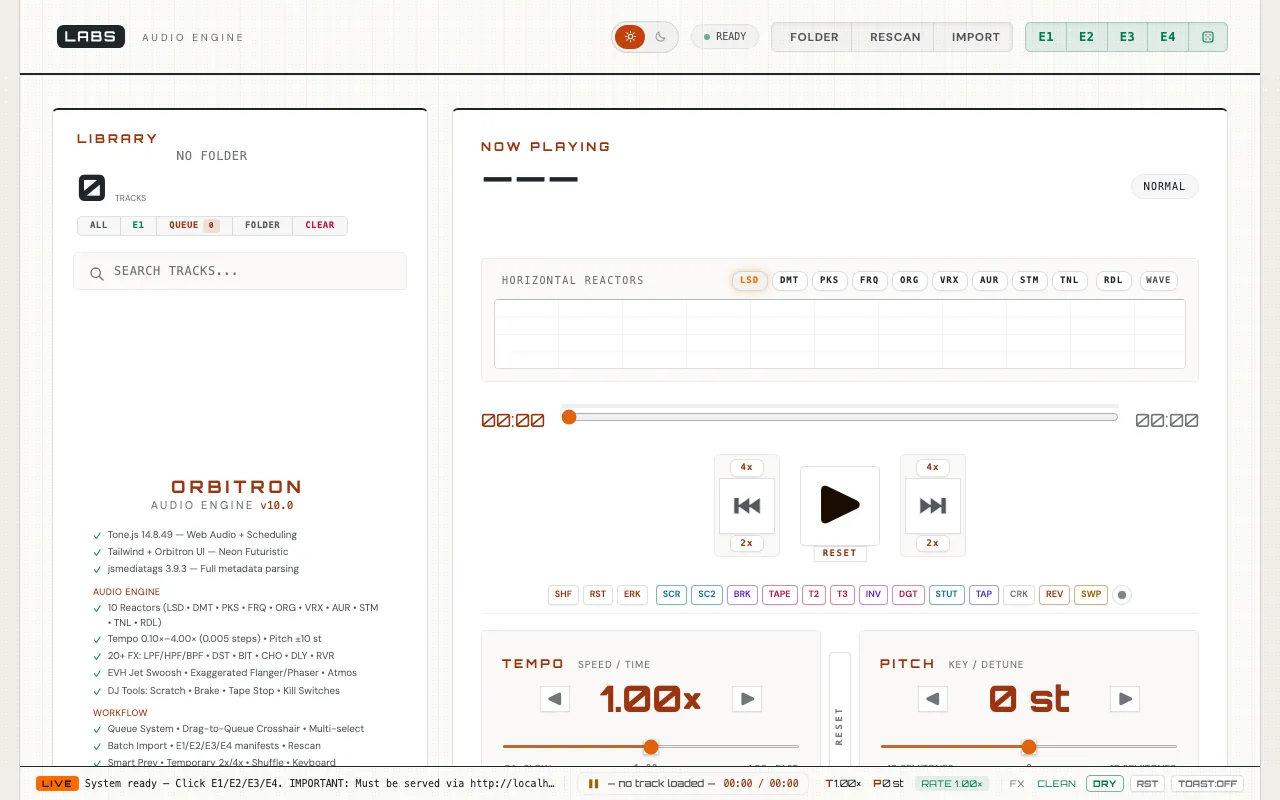
Audio is a music player and DJ deck that runs in a browser tab. Built on Tone.js, it moves tempo anywhere from 0.1x to 4x on one slider, shifts pitch, runs a chain of effects and drives a bank of reactive visualisers, with a queue, scratch and tape-stop. It plays LABS's four music libraries, E1 to E4, or a folder of your own files. There is nothing to install and no account.
One count needs care. The page's own description promises nine visualisers, but its panel carries eleven mode buttons, ten named “reactors” and a waveform, and its feature list says “10 Reactors” (index.html:190, 1631, 1721-1744). The description is out of date; the panel is the thing you use.
It is for listeners and hobby DJs who want to bend a track's speed and pitch, colour it with effects and watch it move.
02How it works
The whole app is one HTML file of 419,581 bytes. It loads Tone.js 14.8.49 from cdnjs and jsmediatags 3.9.3 from jsDelivr, each pinned with a Subresource Integrity hash (audio/index.html:268-276). Sound is processed in the browser's Web Audio graph through Tone.js nodes (PitchShift, BitCrusher, Reverb, StereoWidener, FeedbackDelay, Phaser, Chorus, Distortion, Compressor and Filter), with an Analyser feeding the visualisers (index.html:2910-2940). Your own folder opens through the File System Access API in read-only mode, and ID3 tags are read in the page (index.html:4118-4125, 4572).
Two details show the care taken. The tag reader is held at 3.9.3 on purpose: a comment says the 3.9.4 and 3.9.5 builds ship an empty file, and we measured 3.9.5 at zero bytes. And the E1 to E4 track lists are parsed as data, never run as code. A list must be a JSON array of paths, and it is revalidated with cache: no-cache, so an unchanged list costs a 304 rather than a fresh download (index.html:4262-4278).
03The test
| UTC | What we did | What came back |
|---|---|---|
| 19:59:31 | Page, local 537 copy | HTTP 200, 419,581 bytes. |
| 19:59:42 | Track lists e1.js to e4.js, quoted paths counted | e1 52,577 bytes, 2,154 paths; e2 4,265 bytes, 173 paths (.mp4); e3 18,877 bytes, 712 paths; e4 25,181 bytes, 955 paths. The music files were not fetched. |
| 20:10:32 | The pinned libraries on their CDNs | Tone.js 14.8.49: 346,637 bytes. jsmediatags 3.9.3: 49,545 bytes. jsmediatags 3.9.5: 0 bytes, so the pin is justified. |
Together the four lists name 3,994 paths. We did not play the music itself, because it lives on the main site and these tests contact no live estate host. Had the page followed the newest jsmediatags release, it would have loaded an empty tag reader.
04Against the field
Each comparator was read on its own site on the date shown. We credit what each does better before saying where Audio goes further.
Audacity
Fetched 27 Sep 2026, 20:06 UTC.
Free, open-source desktop software for recording and editing audio on Windows, macOS and Linux, with WAV, MP3, FLAC and Ogg import and export, VST3 and Nyquist plugins, tempo and pitch changes and spectrograms.
Where it does better
- Records, edits and exports audio in the major formats; Audio can do none of that.
- A plugin ecosystem and analysis tools such as spectrograms.
- Open source.
Where Audio goes further
- Nothing to install: tempo and pitch change live while the track plays (
index.html:1935-1944). - Live performance tools, scratch, tape-stop, a queue and visualisers, rather than an editing timeline.
BandLab Studio
27 Sep 2026, 20:06 UTC: a direct fetch returned only a heading, so we relied on a search of bandlab.com and help.bandlab.com.
A free cloud DAW used in the browser or on a phone, with up to 16 audio and MIDI tracks per project, 436-plus virtual instruments, royalty-free loops, real-time effects and up to 50 collaborators.
Where it does better
- A real multitrack studio: recording, MIDI, instruments and loops.
- Cloud projects shared with other people.
Where Audio goes further
- Plays your own folder straight from disk, read-only, without uploading anything.
- No account step appears in its code path.
05Where it falls short
- The page calls itself a “Browser DAW”, but we found no microphone input, recording or MIDI in the code: no getUserMedia, MediaRecorder or Tone.Recorder.
- It cannot save what you hear. The only download writes a track list (
index.html:8405-8417), not audio. - Opening a folder needs the File System Access API; the page itself sends Safari and Firefox users to Chrome or Edge.
- It needs cdnjs, jsDelivr and Google Fonts to answer before it works.
06Filing note
File underLive playback with tempo, pitch and effects; not a recording studio.
Audio is honest engineering inside a narrow brief. The supply chain is pinned and explained, the track lists cannot run code, and your files never leave your machine. If you need to record or export, Audacity and BandLab are the tools; if you want a track at half speed through reverb, with nothing installed and no sign-up, this does it in a tab.
07Spec sheet
| Address | labs.llc/audio/ |
|---|---|
| Where it runs | In your browser, Web Audio via Tone.js |
| Libraries | Tone.js 14.8.49, jsmediatags 3.9.3, both SRI-pinned |
| Music | E1–E4 lists (3,994 paths) or your own folder |
| Tempo range | 0.1x to 4x |
| Saves audio | No |
| Folder access | Chrome or Edge (File System Access API) |
| Measured | 27 Sep 2026, 19:59–20:10 UTC |
| Set against | Audacity; BandLab Studio |